Published by: Ilko van der Velden
Published on: November 29, 2019 11:26
Update Available for customers: The update will be deployed from December 3rd.
Release notes v1.1.2975
What's new
A fully packed Service Hub release is here today, with enhancements, fixes and above all beautiful new features for all to enjoy.
Dashboard
We added a whole new dashboard with the ability to configure add ,customize and remove the components displayed.
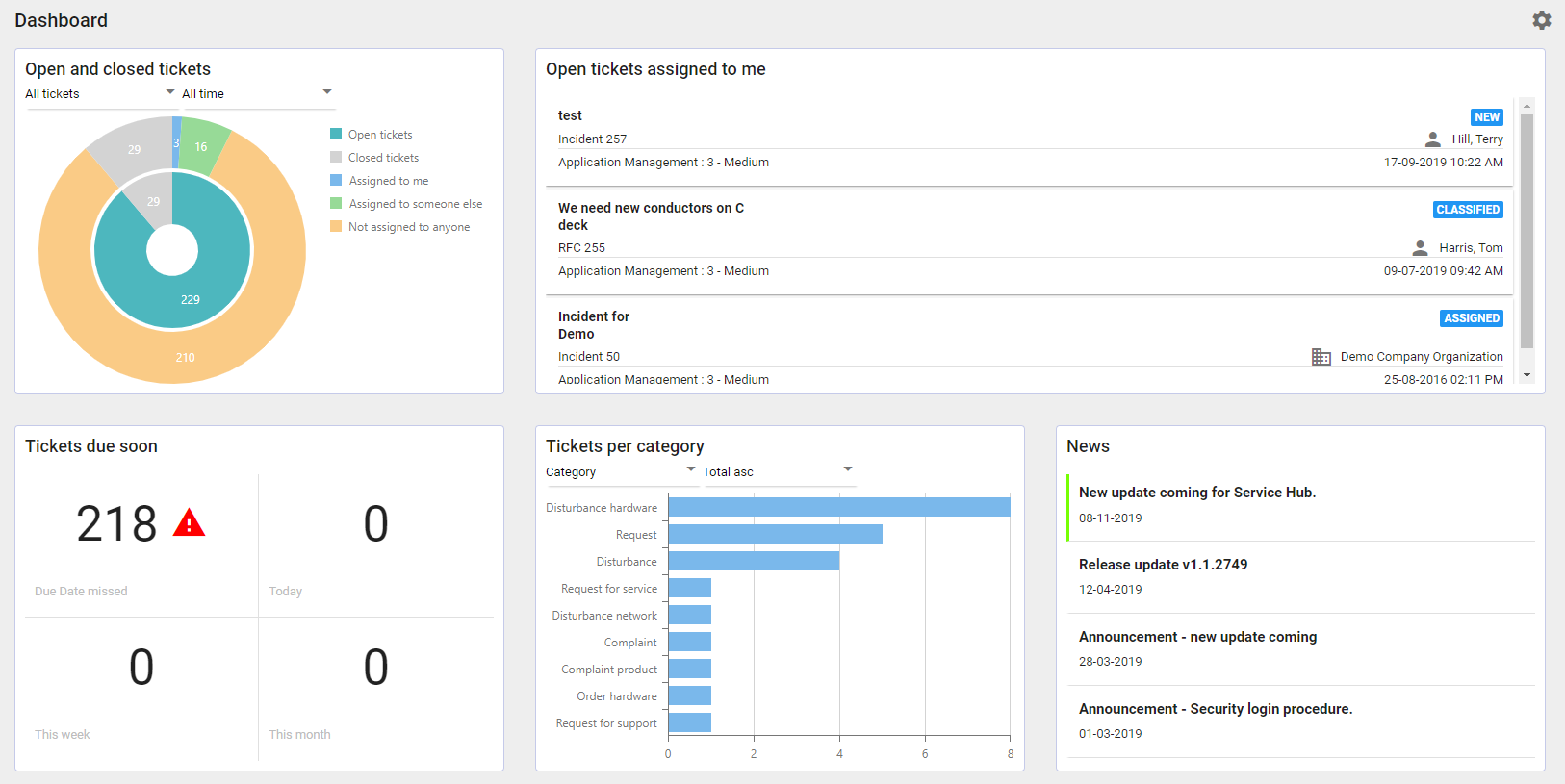
In this release you will have the following components at your disposal;
News and Updates
This section will display all latest news and updates as published on the main docs.service-hub.com site
Tickets bar chart
A barchart showing the number of tickets per category, organisation, or status
Tickets due soon
Four panels showing the amount of open tickets that have missed their due date, are due today, this week, or this month
Tickets per support call type
Four panels displaying the amount of open incidents, problems, RFC's, and service requests
Ticket queues
A stacked barchart displaying the amount of tickets in your queues, and shows who the tickets are assigned to
Open and closed tickets
This chart shows the open and closed tickets, along with their assignment (self, others, unassigned)
Open tickets assigned to me
A clickable list fo all tickets that are open and assigned to you
Opened tickets list
A clickable list of all recently opened tickets
Upcoming appointment
This will display your first upcoming appointment
Every item on the dashboard will have one or more options the user can customize in order to get the most valuable information for them. Also a user can click on any part of a component which will open a list containing the infroamtion the chart is based on.
Menu enhancements
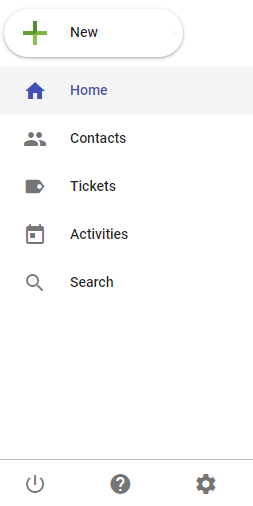
We removed the user profile from the menu and moved it to the topright of service hub where you user account pictogram is visible. We moved the sign out, help and custom list buttons to the bottom left of the menu as displayed below.
Activity enhancements
We added approvals to the activies section which can be accessed by selecting activites and either the list called my pending approvals or All approvals.
Ticket enhancements
We changed the create new ticket wizard on desktops.
Contacts Enhancements
Not only can you now Edit a person you can now also add persons by using the new button on the topleft (desktop only) of your screen.
Create New Person
The following fields will be available for you to use when you want to create a new person.
| Person detail fields | remarks |
|---|---|
| First name | |
| Infix | |
| Last name | |
| Organization | Autocomplete functionality added which automatically looks for available Organizations. |
| Relation Number | |
| Active | Boolean |
| Contact detail fields | remarks |
|---|---|
| Primary phone | |
| Mobile phone | |
| Address fields | remarks |
|---|---|
| Street | |
| House number | |
| House number extension | |
| Addendum 1 | |
| Addendum 2 | |
| Zip code | |
| City | |
| Country | Valuelist of countries |
| Region | Valueslist containing regions |
| Alert | |
| Notes |
Datalimitation
All shipped datalimitations are fully supported now!
Improvements
- Added transitions.
- Added the ability to sort your list from within the actual list.
- Create new / Update- Ticket: Asset input field now selects on asset number and product name.
- Added the on hold and on hold reason to the new ticket screen.
- Create new / Update- Ticket: Asset input field dropdown of autocomplete is now sorted by party name.
- Created transition effect when showing and hiding on hold reason.
- Treeselect controls now actually drills down visually.
- Added loading overlay in the ticket property card
- Moved the "add" button on the desktop to the top Left (New).
- Changed timeline event color when an event is not public.
Fixes
- UI Ticket Detail: Fixed a layout issue when context was a group and not a person
- UX Ticket Detail: Improved performance.
- UX added more realestate so a combination of organization, group and person is displayed more properly.
- UX Activity Detail: Improved performance.
- UX Fixed the "cutting" of the onHold checkbox's glow effect.
- UX Added functionality to allow the user to close the ContextMenu by clicking outside it.
- UX Refreshing a list would add records instead of refreshing the view.
- UX Fixed an issue retrieving assets (sorting)
- Backend Fixed retrieval of persons in the approvals which caused major slowdowns.
Note
As this update is effective immediately you do not need to restart your device or reload the page. In case you experience any problems feel free to contact us.